01
Junk cleanup
Scan cache, temporary files, uninstall leftovers, and unused packages, then review the results before cleaning.
StorageAndroid device care, made clear
Clear space with confidence.
Review what is taking up room, choose what to remove, and keep everyday phone maintenance simple.
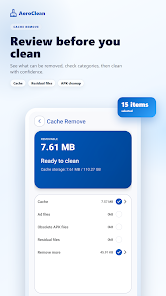
See the details before removing files.
Choose the tools that fit the task.
Grant access only when a feature needs it.
A cleaner view of your phone
AeroClean brings storage review, file cleanup, and device information together in one practical Android app.
Scan cache, temporary files, uninstall leftovers, and unused packages, then review the results before cleaning.
StorageSort photos, videos, audio, documents, archives, and APK files by type and size.
FilesFind extra copies while keeping the original file protected from selection.
DuplicatesReview installed apps, storage use, and app details, then remove apps you no longer want.
AppsCheck memory, battery information, and recent mobile or Wi-Fi data usage in a clear view.
StatusOrganize notifications, find old screenshots, and use guided speaker cleaning tools.
UtilitiesReview-first cleanup
AeroClean presents scan results before you take action. Browse files by category, compare sizes, and decide what should stay.
Choose the area you want to review.
See file types, sizes, and available actions.
Confirm your selection when you are ready.
Permission-aware by design
Some cleanup and device care features need Android permissions to inspect relevant files or settings. AeroClean requests feature-specific access when it is needed, so you can make an informed choice.
Contact privacy supportQuick answers
Need help with something else? Email our support team.
[email protected]AeroClean is designed to show scan results and let you review selections before cleanup. Android system behavior and available actions may vary by device.
Availability and individual features depend on your Android version, device manufacturer, and the permissions you choose to grant.
Android requires permission before an app can inspect certain files, usage information, or device settings. AeroClean asks when a feature needs that access.
AeroClean is available through its official listing on Google Play. Use the store link on this page to make sure you reach the correct app.
A little less digital clutter